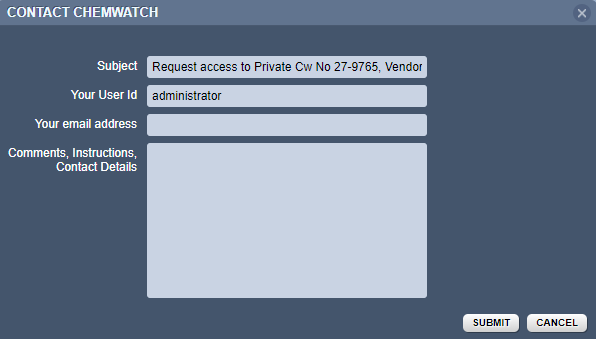
A Privatised SDS is a private safety data sheet that requires permission from the supplier of the product. Users can search for products in the full database collection, however, that particular SDS cannot be displayed. A contact window will display to request access and provide a reason. Chemwatch will grant permission upon approval from the manufacturer.
Steps to Search for a Privatised Product and Request Access
- Press the "Home" module button.
- Select the "Full" database option to look for the material in the Chemwatch full database.
- Click on the "Vendor SDS" button to set the type of document.
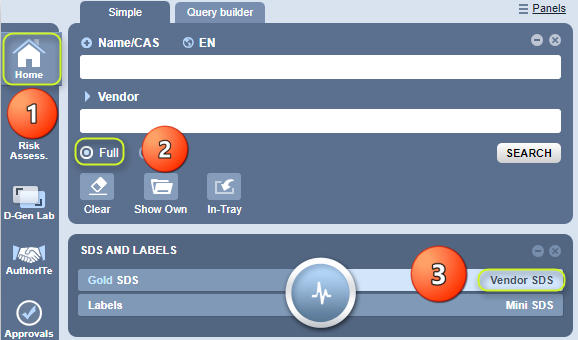
4. Type the name of the Product in the Name/CAS text field.
5. Select the Material Name from the search results list.
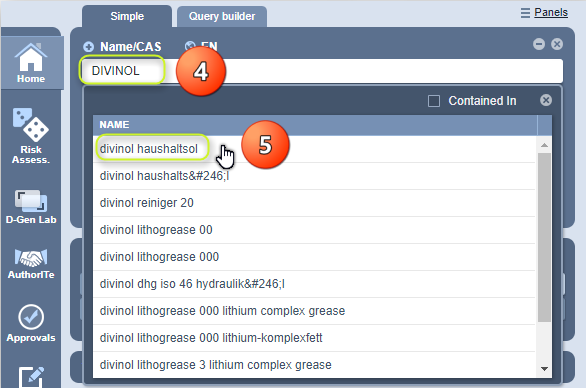
6. Click on the "Name of the material" from the materials list.

7. Click on the "Document Name" of the SDS from the document list alongside the Vendor.

8. Fill in the required information in the Contact Window and submit the request for access to the private SDS.
Note:
Chemwatch will respond back through email on the status of the request.
Was this article helpful?
That’s Great!
Thank you for your feedback
Sorry! We couldn't be helpful
Thank you for your feedback
Feedback sent
We appreciate your effort and will try to fix the article