The following steps show how to search for material from your inventory by User Part No. option.
Steps to Search by User Part Number
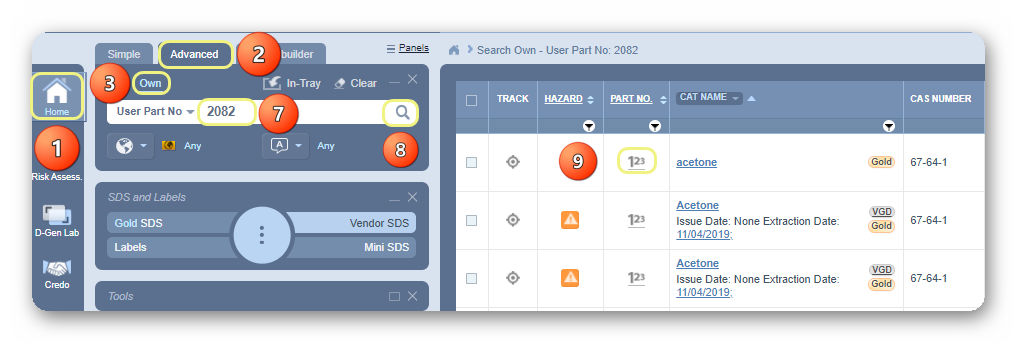
- Select Home Module button
 .
. - Press the Advanced search tab from the Search panel.
- Press the Own search option within the Search panel.
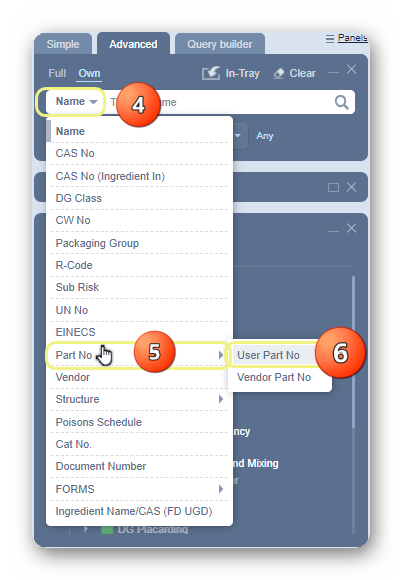
- Select Name drop-down arrow in the Search text field.
- Hover the mouse over to Part No forward arrow.
- Click on the User Part No to set it as the current search method.
7. Type the User Part number for the material in the free text field.
8. Press the Search button.
9. Click the Part Number alongside the name of the product.
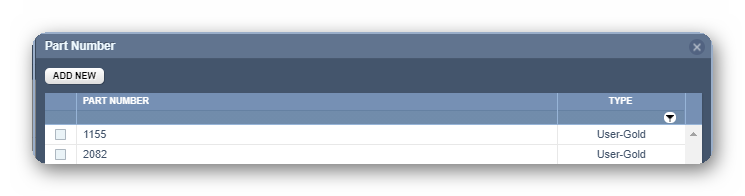
10. The part number window displays a list of available part numbers associated with the material.
Was this article helpful?
That’s Great!
Thank you for your feedback
Sorry! We couldn't be helpful
Thank you for your feedback
Feedback sent
We appreciate your effort and will try to fix the article