Query Builder search is designed for the conditional construction of queries to search for specific information using a set of rules and search parameters. A query is built by selecting a search index from the context menu options and can also choose a database logical operand “AND, OR” for complex searches to extend the search further. Query Builder users must be granted permission to create, edit and use custom queries by the system’s administrator within your company or organisation.
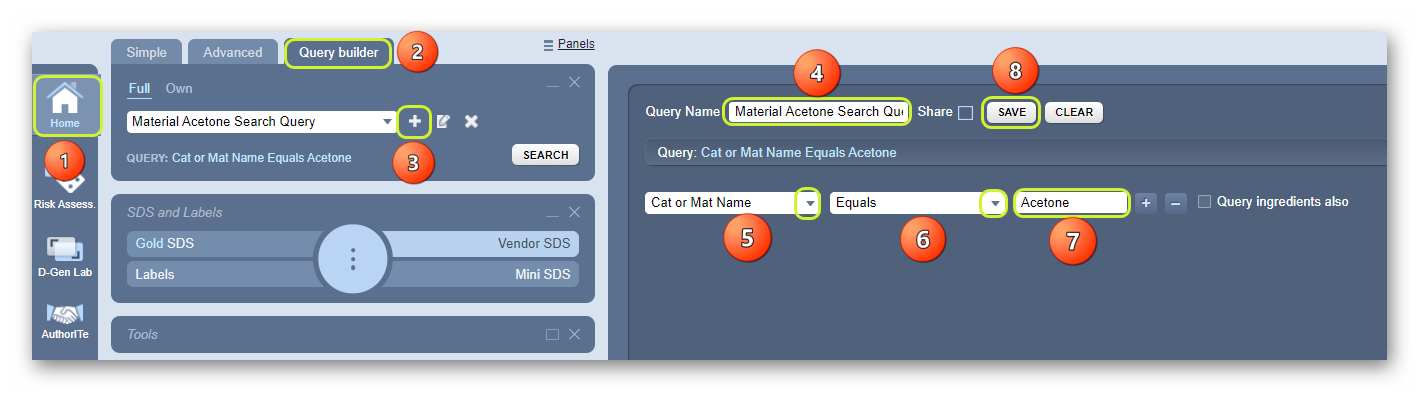
Steps to Create a Material Name-based Type of Query
- Select the Home module button
 .
. - Press the Query Builder tab from the Search Panel.
- Click the Add icon
 .
. - Type the query name in the text field, e.g., Material Acetone Search Query.
- Click the drop-down arrow
 to select the “Search option from the drop-down list.
- Click
 the drop-down arrow
 to select the string operand, e.g., Equals.
 - Type the name of the Material, e.g., Acetone.
- Click
 the Save button to complete the creation of a material name search query. A confirmation message displays.

The next action would be to search for material using the newly created query in the Query Builder mode.
Was this article helpful?
That’s Great!
Thank you for your feedback
Sorry! We couldn't be helpful
Thank you for your feedback
Feedback sent
We appreciate your effort and will try to fix the article