To search by a query requires that the query be created first. This worked example will illustrate a basic query name search. The steps below illustrate how to use the created search query for “Acetone”. Note that the search query excludes ingredients.
Steps: Search by Cat or Material Name Query
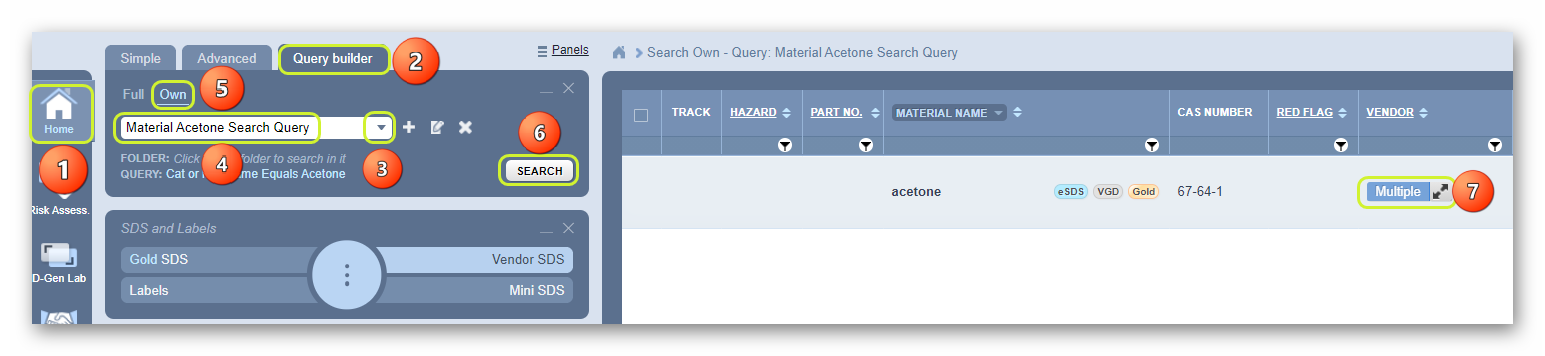
- Select the Home module
 .
. - Press the query builder tab from the Search Panel.
- Click the drop-down arrow
 from the query builder search panel’s field to list the available search options.
 - Click the “query name, e.g., Material Acetone Search Query.
- Click the Full or Own link to specify the database path.
The “Own” search path option refers to your own company or organization’s inventory within the Chemwatch Database collection.
6. Click the Search button to start the query.
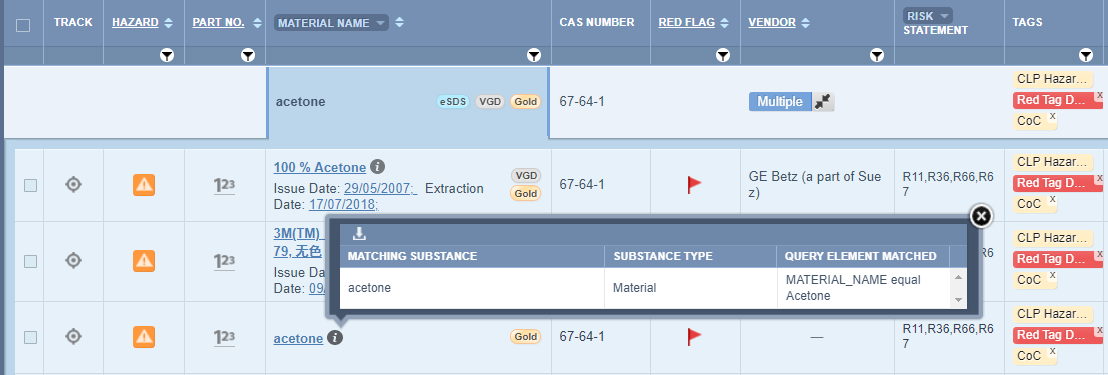
7. Click the Multiple button to expand the material name row to the cat name (product name) associated with the found material.
The query search results display the name(s) of the cat name(s) with the respective vendor
8. Hover the mouse pointer on the cat name’s information icon to view more details on the pop-window.
Was this article helpful?
That’s Great!
Thank you for your feedback
Sorry! We couldn't be helpful
Thank you for your feedback
Feedback sent
We appreciate your effort and will try to fix the article