Preferred Names Filter Setting
The preferred name filter setting must be checked to activate the preferred name feature to display on the materials grid’s chemical name right-click menu and the tools panel. The following steps show how to activate the preferred names feature (if permissions to the Filter Settings are granted by the administrator).
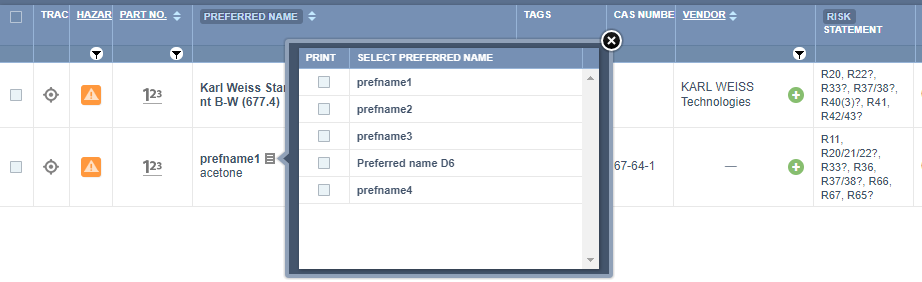
Preferred Name(s) List to Select the One to Show in a Gold SDS
Multiple preferred names have been created for the same material. The preferred name 1 (Acetone) was originally assigned to the material's Gold SDS. The next step is to change the preferred name by re-assigning the preferred one.
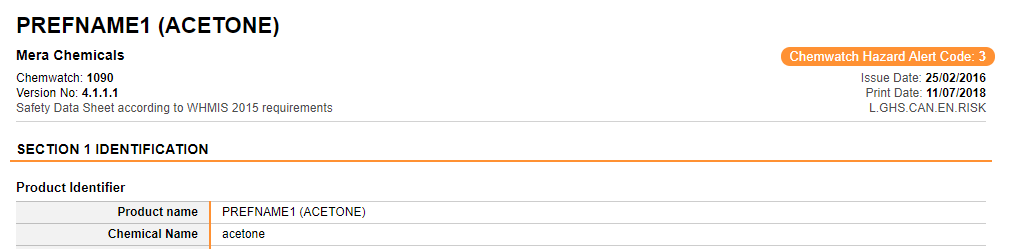
Display Preferred Name of Interest to a Gold SDS
This exercise assumes that there are already multiple Preferred Names existing in your domain and that your filters already have been selected to show preferred names-checked in the filter settings page. If the preferred names do not show in the materials table, check with your administrator or contact the Chemwatch helpdesk or send a request in the chat with one of our support teams online. If the filter settings are accessible, the checks relevant to showing preferred names should look like the screenshot below.
Steps to Display Preferred Name on a Gold SDS Material
- Open the folder to view a list of materials
- Click on the Material Name table header and change the view to the "Preferred Name" button as shown
- Click on the Preferred Name block icon next to the preferred name in order to expand the list of preferred names
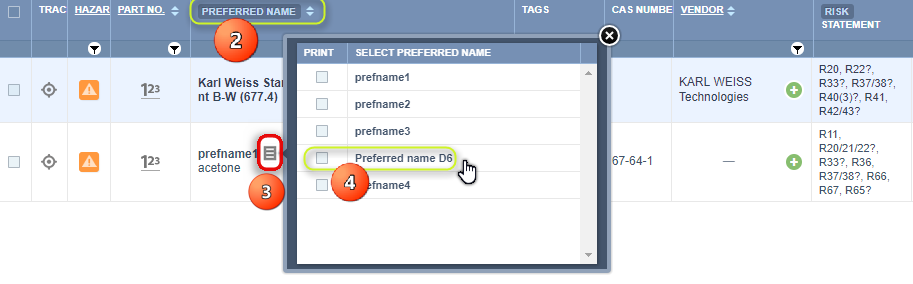
The listing of the initial preferred name will automatically change to the new preferred name.

4. Click on the preferred name checkbox of interest to load and render the Gold SDS (ensure that you have the Gold SDS button selected from the SDS and Labels Panel.
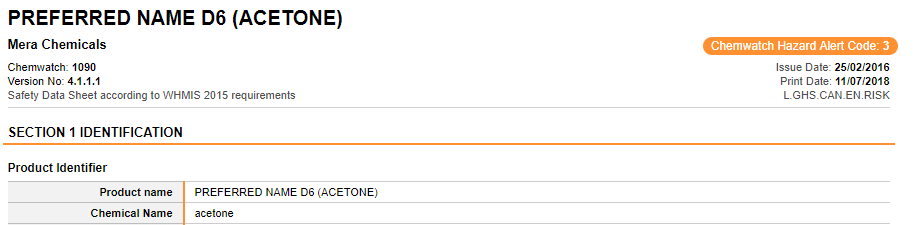
The system automatically displays the Gold SDS showing the selected preferred name. Preferred name will be shown in Section 1: Identification; of the Gold SDS as depicted below.
Was this article helpful?
That’s Great!
Thank you for your feedback
Sorry! We couldn't be helpful
Thank you for your feedback
Feedback sent
We appreciate your effort and will try to fix the article