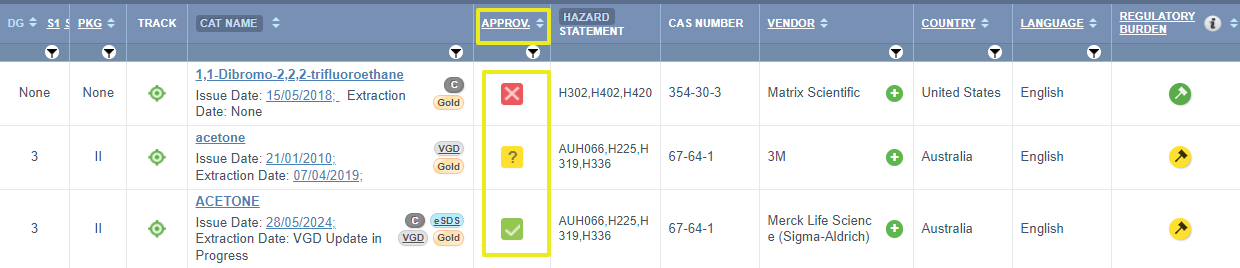
The "Approv." column in the Manifest grid is an optional function that can be used for any general approval purpose. Below is a summary of the approval attributes.
Column | Attributed Function | Use |
Approv. | This is a user-dependent field for setting an approval status of a material: Set approval by a Specific Person, Use by; Risk Assessment and Dates. Note that this setting does not relate to nor is it linked to the Approvals Module. It is a static record entry. | This attribute can be used for any approval criterion. It provides these Approval Status options: Not Approved, Approval Required or Approved.
|
 Not Approved
 Approval Required
 Approved
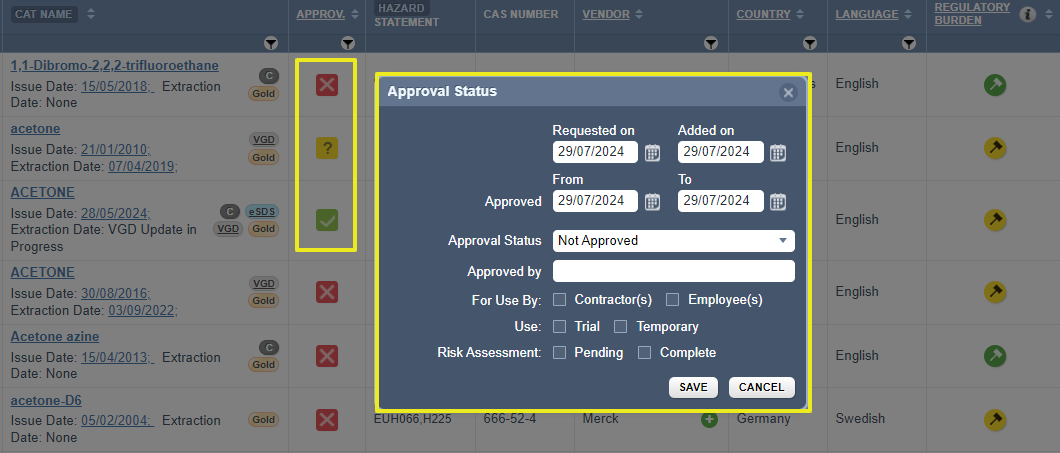
This Approval feature enables users to enter approval details and the status of the material. Note that, only specific users can be assigned an administrative privilege to manage approvals in Manifest mode.
The approval status window provides specific data fields to be filled:
- Requested on
- Added on
- From
- To
- Approval status
- Approved By
- For use by checkbox(es)
Was this article helpful?
That’s Great!
Thank you for your feedback
Sorry! We couldn't be helpful
Thank you for your feedback
Feedback sent
We appreciate your effort and will try to fix the article