Steps: Search for a Product from your Own Inventory by Preferred Name
- Select the Home module button
 .
. - Press the Simple tab.
- Press the Own search path from the Search Panel.
- Select the Vendor SDS button from the SDS and Labels panel.
- Type the Preferred Name, in the Name/CAS field e.g., Max dibromoethane.
- Press the Search button.
- Click on the Track icon to locate the folder.
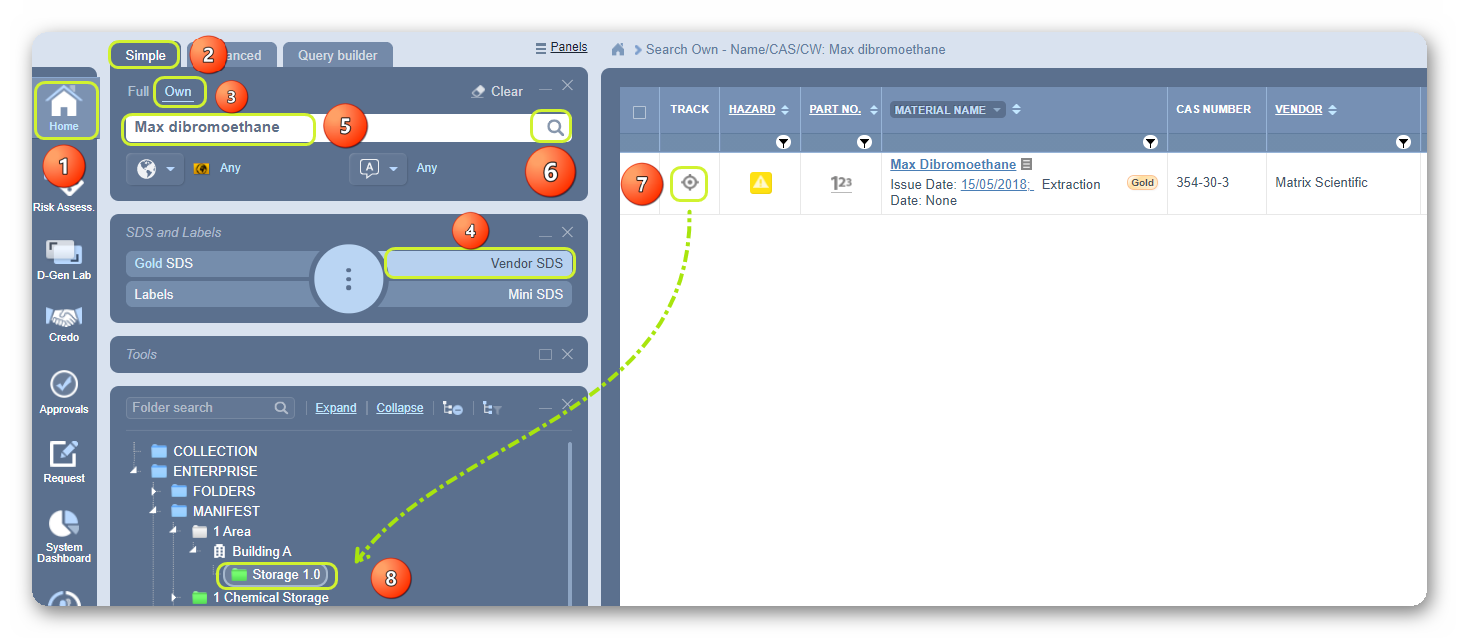
8. Click on the folder name to open the list and open the Vendor SDS linked to the material with preferred name.
Was this article helpful?
That’s Great!
Thank you for your feedback
Sorry! We couldn't be helpful
Thank you for your feedback
Feedback sent
We appreciate your effort and will try to fix the article