Steps to Copy a Material into Another Folder
Open the Home module .
.
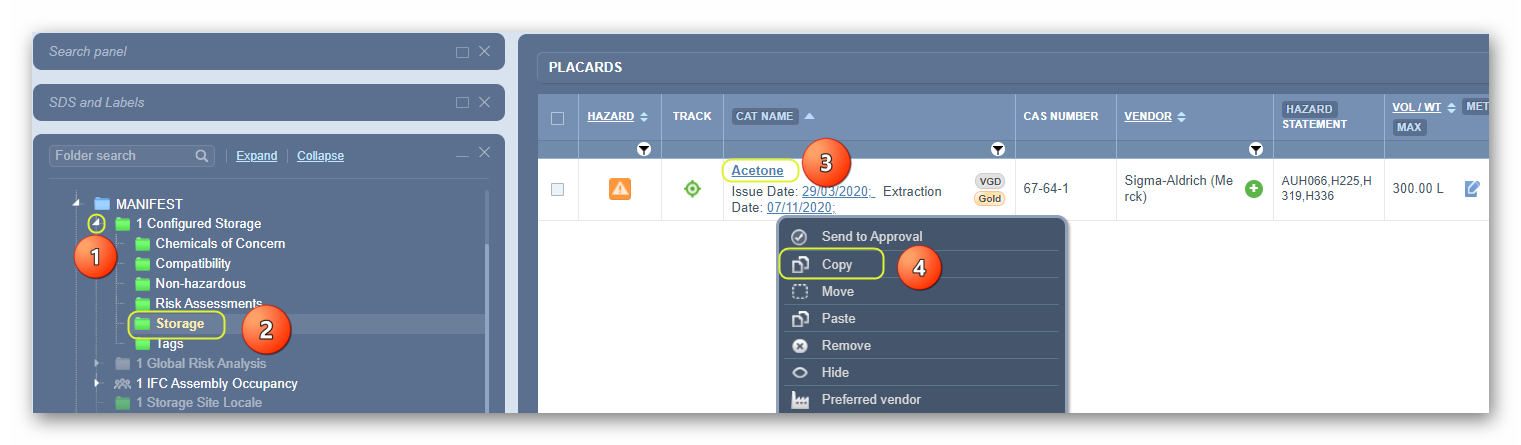
- Expand
 Manifest Directory, Area, Section to view folder nodes to identify the specific folder location, e.g., a storage green folder.
 - Click the folder name to display records contained in that source folder.
- Right-click on the product name (by specific vendor, country, language and issue date from the product listing in Cat Name view mode.
- Select the Copy option.
5. Right-click on the destination folder, e.g., storage folder is grey  , depicting an empty folder.
, depicting an empty folder.6. Select the Paste option from the menu.
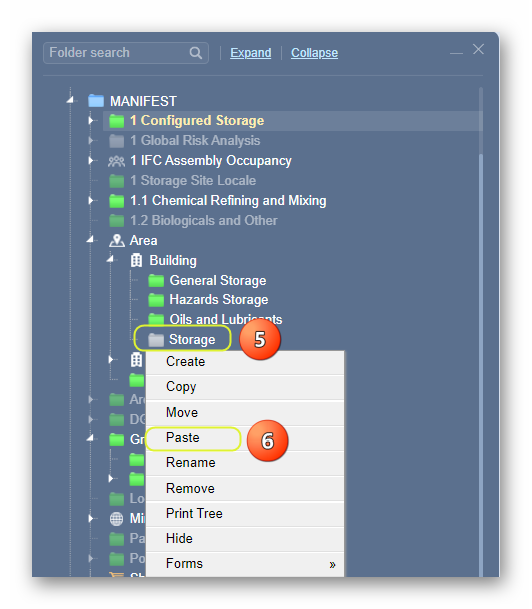
7. The storage grey folder  turns green
  , which depicts a folder with a material copied into it. Select the green folder to display record for the copied product.

A confirmation message will be displayed to confirm a successful task.

If a user does not have read-write access to a folder, a message will display to seek further help from the administrator. The copied line item DOES NOT keep the volume/weight from the source folder.
Was this article helpful?
That’s Great!
Thank you for your feedback
Sorry! We couldn't be helpful
Thank you for your feedback
Feedback sent
We appreciate your effort and will try to fix the article