Retrieving deleted folders requires checking if you have folder permission to copy or move the materials from the DELETED directory by using the click functionality and choosing the appropriate option from the context menu, e.g., Move. Follow the steps below.
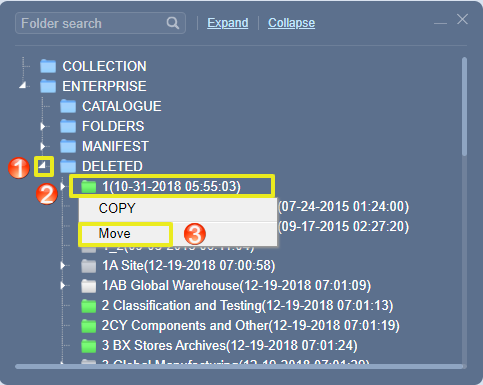
- Expand the DELETED directory to view deleted folders.
- Right click on folder under the DELETED directory.
- Select the Move option from the context menu to move back the folder to a destination folder.
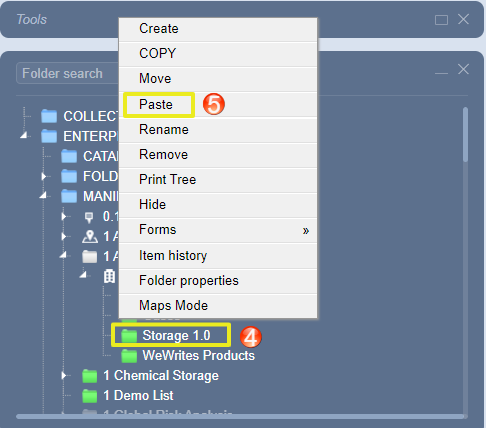
- Right click on the destination folder or area or section or location.
- Select Paste.
If you cannot edit folders in the DELETED directory, contact the administrator within your business or organisation to grant you the applicable edit rights or privileges. If you already have permission to edit in this DELETED directory and are still unable to do so, submit a ticket to helpdesk@chemwatch.net for further support or use the chat panel to be assisted online.
Was this article helpful?
That’s Great!
Thank you for your feedback
Sorry! We couldn't be helpful
Thank you for your feedback
Feedback sent
We appreciate your effort and will try to fix the article