Folder Edit | Task Attribute |
Copy
| Users can copy a folder from any node under Folders or Manifest directories and paste it into another folder if the user has read-write folder permissions. |

The following steps demonstrate how to copy a single folder from a folder node and paste it into another folder location.
Steps to Copying a Folder into another
Go to the Home module .
.
- Expand the tree node
 and press the mouse right-click on the Storage green folder node.
 - Select the Copy option from the drop-down task menu to a clipboard.

3. Right-click on the destination green folder node.
4. Click the Paste option from the drop-down arrow menu.
menu.
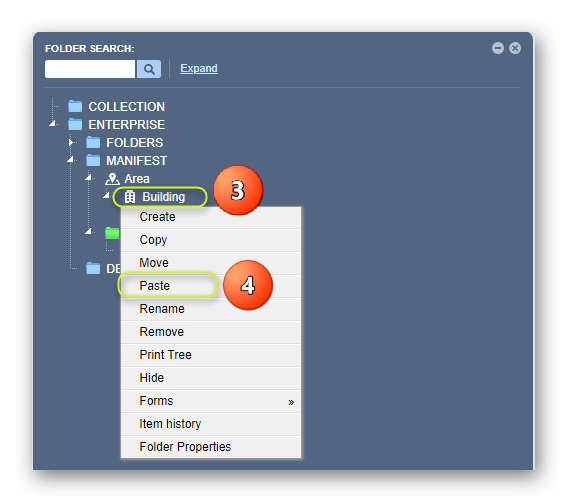
5. The copied storage folder is added to the new folder location, e.g., under the Building node.

A message confirms task completion from the top middle area of the user interface.

Was this article helpful?
That’s Great!
Thank you for your feedback
Sorry! We couldn't be helpful
Thank you for your feedback
Feedback sent
We appreciate your effort and will try to fix the article