A Folder in the tree panel means any folder in general. However, we differentiate a folder and a store by the location of the folder in the FOLDERS and MANIFEST system's directories.
FOLDERS Directory: The subsidiary folder under this directory is termed a "Folder".
MANIFEST Directory: The subsidiary folder under this directory is termed a "Store".
For businesses or organisations with large sites, the Manifest structure is tailored with the following basic demarcation of their locations based on a Site Map.
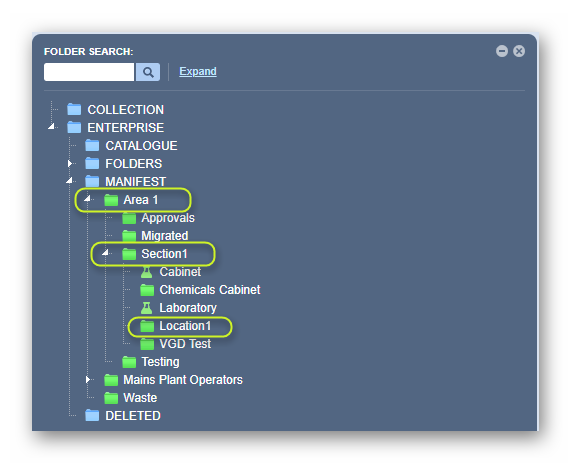
Site Map Levels - Descriptions
| Area (Level 1) | Section (Level 2) | Location (Level 3) |
| The area can be termed as a site, a building or a location. The area is also known as the parent folder, usually designated as a level 1 folder. | A section can be termed as a division, a building or a department. The section is also known as a child folder to the parent folder in level 1 and designated as a level 2 folder. | A location can be termed as a storage facility or compartment in a storage room, or a store. The location is also known as a child folder to the parent folder in level 2 and is usually designated as a level 3 folder, called a "store". |
| The area is added under the MANIFEST directory. | The section is added under the area or site. | The location is added under a section as a store. |
| Permissions can be assigned to the area by the domain administrator of the program to control who can edit the parent folder (area or site). | Permissions can be assigned to a section by the domain administrator of the program to control who can edit the child folder (building or department). | Permissions can be assigned to the location by the domain administrator of the program to control who can edit the child folder (store). |
Tree Structure illustration for an Area/Section/Location.
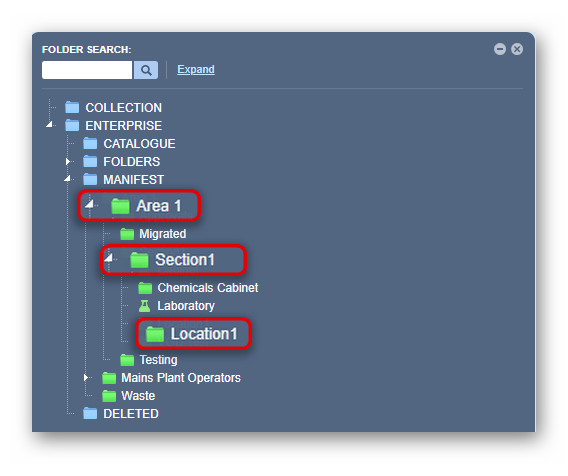
| Directory Node | Description | Additional Information |
| Collection | Entire collection of custom inventory [include archived and current registers and history] | Material register, inventory of own data since the beginning of the license with Chemwatch. |
| Enterprise | Entire collection of custom inventory [include archived and current registers] | The Folders directory and divisions are accessible in the Manifest module. |
| Folders | Collection of custom inventory [includes unfiled folders] | The Folders directory and divisions are accessible in the Manifest module. |
| Manifest | Areas, sections, locations/stores for compliance purposes [filing system that represents a site map of sites, buildings and locations/stores where chemicals are stored, used, or handled] | Compliance requirement. |
| Deleted | All deleted folders/stores or materials are archived in the DELETED directory | For example; Australian businesses must keep records for 30 years. |
| Attributes | Add, copy or move, and rename folders under the parent system's directories | Cannot add, copy, move or remove the system's directories. |
Was this article helpful?
That’s Great!
Thank you for your feedback
Sorry! We couldn't be helpful
Thank you for your feedback
Feedback sent
We appreciate your effort and will try to fix the article