PPrint tree can be accomplished from any folder node depending on the level of access to visible folder nodes within the entire tree structure. Right-clicking any folder level will print the respective visible folders from that selected level including all subsidiary (child) folders. Print tree enables users to generate a print format of the tree structure in Acrobat’s pdf format
 . The steps below illustrate “how to print the tree structure”.
Steps to Print Manifest Tree Nodes as per user credentials and visible folder permitted
Go to the Home module  .
.
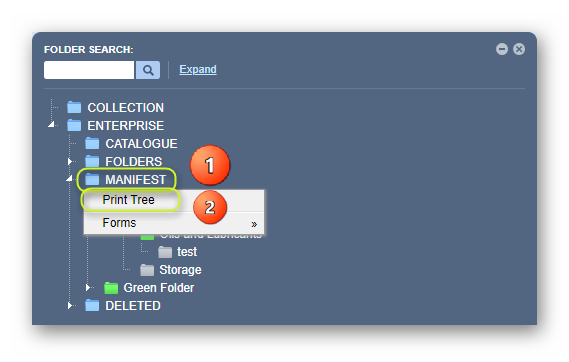
1. Right-click on the Manifest directory folder node
2. Select the Print Tree option from the drop-down task menu
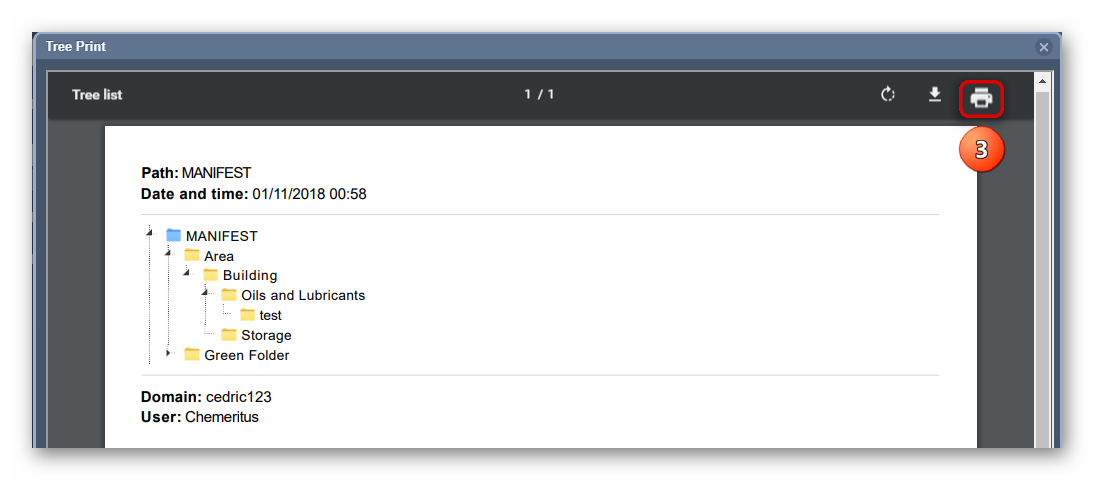
3. Click on Acrobat's Print  button on the top right corner of the Acrobat Reader window.
Was this article helpful?
That’s Great!
Thank you for your feedback
Sorry! We couldn't be helpful
Thank you for your feedback
Feedback sent
We appreciate your effort and will try to fix the article