The process of creating a Manifest involves:
- Creating a folder structure that represents the site map
- Adding materials or products with respective SDS
- Adding volume/weight for materials or products
The following steps illustrate creating an Area, Section and Location (Storage folder) under the Manifest directory. User folder permission is required to create and edit folders.
Permission | Folder Type | Attribute |
Read-write
|
| User can create folder nodes within the tree if granted edit rights to manage folders. |


Steps to Creating a Folder (Area)
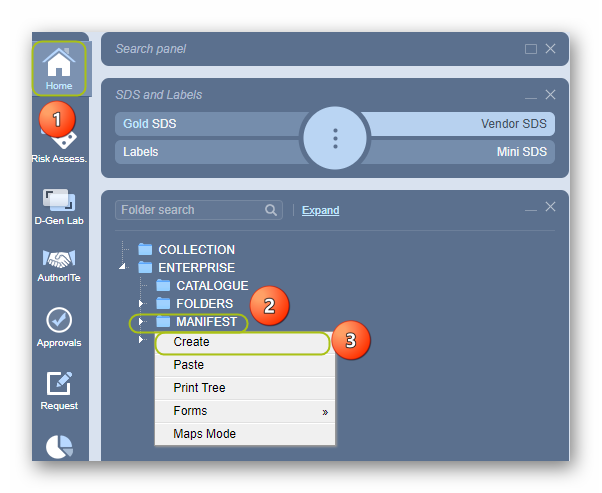
- Go to the Home module
 (if it is not already the default module).
 - Right-click on the Manifest Directory folder node.
- Select the Create from the drop-down task menu.
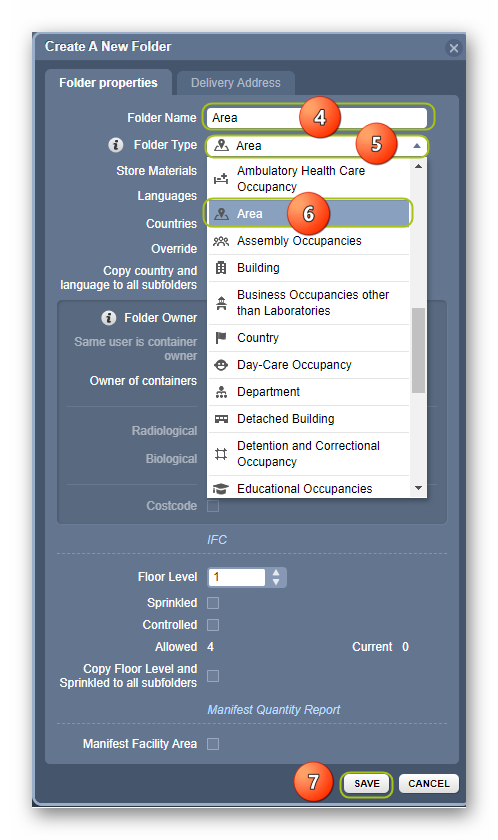
4. Click the folder name text field and type the name of the folder, e.g., Area.
5. Click the folder type drop-down arrow to list the types of folders.
6. Scroll down the list and select the Area folder type.
7. Click the Save button to add the folder.
8. The Area folder is created .
.
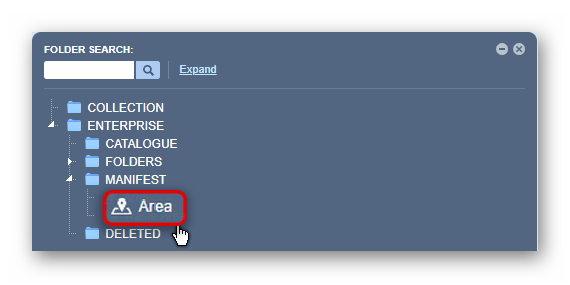
A message confirms task completion from the top middle area of the user interface.
Follow the same steps to create a Building and a Storage folder.
Was this article helpful?
That’s Great!
Thank you for your feedback
Sorry! We couldn't be helpful
Thank you for your feedback
Feedback sent
We appreciate your effort and will try to fix the article